GTA III / 工具
Play GTA 3 PC Through Your Phone/Tablet (Apple Android Microsoft Phones work) - Supplement Scripts for Remotr 1
- TheRealFookin | 上传者: TheRealFookin
- 03/13/2016
- 20831 下载量
评分:
请先登录。
收藏夹:
Videos
尚未添加任何视频。你需要先登录才能为该 Mod 添加视频。
描述
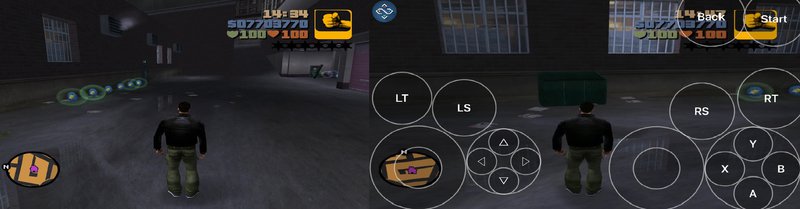
This mod requires no internet connection at all so you can play GTA 3 outside or inside doesn't matter!
If you dont want the annoying contols showing on your screen then click on the icon on the top left center of your screen and find the xbox 360 controler icon, and find Torchlight Default and click on it and get out of the app quick and get back on and connect to your pc, thats it.
HOW TO INSTALL:
Step 1: Download my mod
Step 2: Open IP ADDRESS (SAFE)
Step 3: Find IPv4 Address. . . . . . . . . . . : (Your IP Address) you will need this
Step 4: Go to your pc and click on start menu and search 'This PC' and right click on 'This PC' and hit properties and find Full PC's Name You will need the IP Address and PC's name
Step 5: Download RemotR http://remotrapp.com/ and download RemotR on your phone (Microsoft Phone, Android Phone, Apple Phone, doesn't matter)
Step 6: Open RemotR on your PC
Step 7: Put my mod (Script.dll) in the RemotR Directory
Step 8: Open up RemotR on your phone and copy the IP Address and PC's Name on the RemotR app
Step 9: Wait for the icon of a pc to turn white and click on it
Step 10: Find GTA 3 or go scroll down till you find "Desktop" and click on that
Play GTA 3
If you dont want the annoying contols showing on your screen then click on the icon on the top left center of your screen and find the xbox 360 controler icon, and find Torchlight Default and click on it and get out of the app quick and get back on and connect to your pc, thats it.
HOW TO INSTALL:
Step 1: Download my mod
Step 2: Open IP ADDRESS (SAFE)
Step 3: Find IPv4 Address. . . . . . . . . . . : (Your IP Address) you will need this
Step 4: Go to your pc and click on start menu and search 'This PC' and right click on 'This PC' and hit properties and find Full PC's Name You will need the IP Address and PC's name
Step 5: Download RemotR http://remotrapp.com/ and download RemotR on your phone (Microsoft Phone, Android Phone, Apple Phone, doesn't matter)
Step 6: Open RemotR on your PC
Step 7: Put my mod (Script.dll) in the RemotR Directory
Step 8: Open up RemotR on your phone and copy the IP Address and PC's Name on the RemotR app
Step 9: Wait for the icon of a pc to turn white and click on it
Step 10: Find GTA 3 or go scroll down till you find "Desktop" and click on that
Play GTA 3
评论
目前已发表了 3 条评论。