GTA V / 汽车 / 纹理
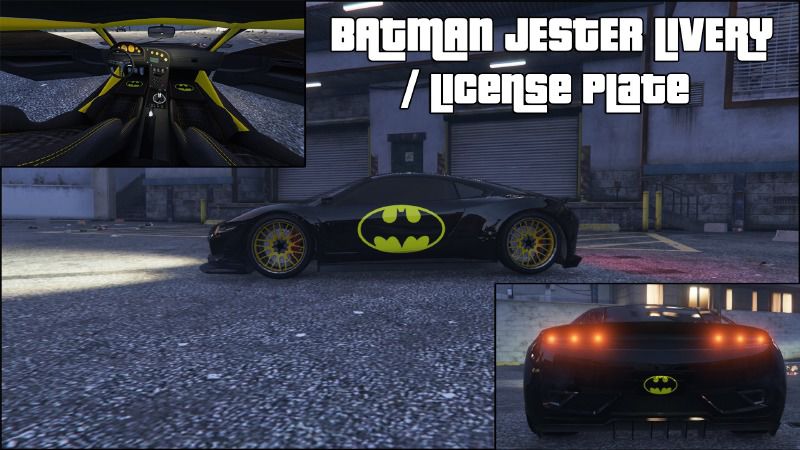
Batman Jester Livery / License Plate
- brandon4179 | 上传者: runitsalpha
- 06/02/2015
- 2873 下载量
评分:
请先登录。
收藏夹:
Videos

你需要先登录才能为该 Mod 添加视频。
描述
VIDEO - https://youtu.be/IWq07FO1gcA
Car Installation:
1. Go into GTA V in OpenIV.
2. navigate to update\x64\dlcpacks\mpchristmas2\dlc.rpf\x64\levels\gta5\vehicles\xmas2vehicles.rpf. and make sure Edit Mode
is activated.
3. Then find jester2.ytd.
4. Make a backup copy (Extract it).
5. Replace it with jester2.ytd from the Batman Jester Folder.
License Plate Installation:
1. Go into GTA V in OpenIV.
2. navigate to GTA V\x64e.rpf\levels\gta5\vehicles.rpf. and make sure Edit Mode
is activated.
3. Find vehshare.ytd
4. Make a backup copy (Extract it).
5. Replace it with vehshare.ytd from the Batman License Plate folder.
6. Vist LS Customs and buy the Yellow on Black Plate.
This is not needed if you don't want to use it, the skin will work fine without the license plate.
I suggest downloading Customize Plate Mod and setting the license plate blank.
Download Link: https://www.gta5-mods.com/scripts/customize-plate
Don't go Online with this mod, you may get banned!
By: Brandon4179
Car Installation:
1. Go into GTA V in OpenIV.
2. navigate to update\x64\dlcpacks\mpchristmas2\dlc.rpf\x64\levels\gta5\vehicles\xmas2vehicles.rpf. and make sure Edit Mode
is activated.
3. Then find jester2.ytd.
4. Make a backup copy (Extract it).
5. Replace it with jester2.ytd from the Batman Jester Folder.
License Plate Installation:
1. Go into GTA V in OpenIV.
2. navigate to GTA V\x64e.rpf\levels\gta5\vehicles.rpf. and make sure Edit Mode
is activated.
3. Find vehshare.ytd
4. Make a backup copy (Extract it).
5. Replace it with vehshare.ytd from the Batman License Plate folder.
6. Vist LS Customs and buy the Yellow on Black Plate.
This is not needed if you don't want to use it, the skin will work fine without the license plate.
I suggest downloading Customize Plate Mod and setting the license plate blank.
Download Link: https://www.gta5-mods.com/scripts/customize-plate
Don't go Online with this mod, you may get banned!
By: Brandon4179
评论
目前已发表了 1 条评论。