GTA V / 修改器
Location Saver | Custom Map Blips & Teleport [GUI]
- efeiltms | 上传者: efeiltms
- efeiletmis.dev
- 10/11/2026 (最后更新: 10/12/2026)
- 80 下载量
评分:
请先登录。
收藏夹:
![Location Saver | Custom Map Blips & Teleport [GUI]](/img/202610/b/cf19b64840afa409459f33e2b04d54c4.jpg)
![Location Saver | Custom Map Blips & Teleport [GUI]](/img/202610/b/c2562ed83aee3daed50bcd3a8a1535ca.png)
![Location Saver | Custom Map Blips & Teleport [GUI]](/img/202610/b/6c0fd5b517f9482f558ed2dfd95f5668.png)
![Location Saver | Custom Map Blips & Teleport [GUI]](/img/202610/b/9b33969b542da27cae846b036f27b1ad.png)
视频
你需要先登录才能为该 Mod 添加视频。
描述
==================================================
LOCATION SAVER v1.1 by efeiltms
==================================================
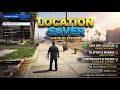
Location Saver is a lightweight, customizable, and feature-rich script for GTA V that allows you to save any location on the map with custom icons (blips) and colors. You can easily teleport to saved locations, manage and edit them via an in-game menu, rename them, change their icon/color on the fly, or delete them anytime.
All saved locations and settings are automatically saved and persistent across game sessions.
--------------------------------------------------
? WHAT'S NEW IN v1.1 (CHANGELOG)
--------------------------------------------------
- Scrollable Location List: Fixed menu text overflowing off-screen! The saved locations list now features a smooth scroll system (displays 5 items per page).
- Advanced Location Editor: You can now change the Icon and Color of already saved locations in the edit menu, complete with a dedicated "[+] Save Changes" button.
- Input Cancel Fix: Pressing ESC or leaving the text box blank when saving a location now cancels the process properly instead of saving empty locations.
- Smart Pause Control (Menyoo Style): Game pause controls are disabled while navigating the menu. Pressing "P" with the menu open gracefully closes the menu first, then opens the game pause screen.
--------------------------------------------------
? FEATURES
--------------------------------------------------
- Custom Map Blips: Choose icon types (Waypoint, Safehouse, Garage, Armory, Vehicle) and colors (Yellow, Red, Green, Blue, White, Purple).
- Interactive GUI Menu: Clean, custom-built menu with blue header, status bar, and scrollable list support.
- Full Location Management: Teleport to saved locations, edit their name/icon/color anytime, or delete them.
- Multi-Language Support: English (Default), Turkish, and Spanish.
- Custom Menu Key: Change the menu toggle key inside Settings (F11, F10, F9, F8, F7, F5, J, K, L, M, N).
- Cheat Code Activation: Forgot your key? Type "locationsaver" in the cheat console to open the menu anytime!
- Persistent Storage: Saves all waypoints and config preferences automatically.
--------------------------------------------------
⚙️ REQUIREMENTS
--------------------------------------------------
- ScriptHookV : https://www.gta5-mods.com/tools/script-hook-v
- ScriptHookVDotNet v3.7.0+ : https://www.gta5-mods.com/tools/scripthookv-net
--------------------------------------------------
? INSTALLATION
--------------------------------------------------
1. Download and install ScriptHookV and ScriptHookVDotNet v3.
2. Place `LocationSaver.dll` into your `Grand Theft Auto V/scripts/` directory.
3. Launch the game and press F11 (or type "locationsaver" in the cheat console) to open the menu!
--------------------------------------------------
? CONTROLS
--------------------------------------------------
- F11 (or selected key) : Open / Close Menu
- Arrow Keys (Up/Down) : Navigate menu
- Arrow Keys (Left/Right): Change options (Icons, Colors, Keys, Languages)
- Enter : Select / Save
- Backspace / ESC : Go back / Close menu
- P Key : Close menu & open game pause screen
--------------------------------------------------
? CREDITS
--------------------------------------------------
Created by efeiltms
==================================================
TÜRKÇE AÇIKLAMA
==================================================
Location Saver, GTA V haritasında bulunduğunuz herhangi bir konumu özel simge (blip) ve renkler seçerek kaydetmenizi sağlayan gelişmiş ve hafif bir konum yöneticisi modudur.
--------------------------------------------------
? v1.1 İLE GELEN YENİLİKLER
--------------------------------------------------
- Kaydırılabilir Konum Listesi: Kayıtlı konumlar listesinde ekrandan taşma sorunu çözüldü! Liste artık sayfalama (teker mantığı) ile maksimum 5 elemanlı kaydırılabilir görünüm sunar.
- Konum Düzenleme & Kaydet Butonu: Kayıtlı konumlara tekrar girildiğinde Simge (Icon) ve Renk (Color) değiştirme seçeneği eklendi. Değişiklikler yalnızca "[+] Değişiklikleri Kaydet" butonuna basıldığında uygulanır.
- İptal Düzeltmesi: Konum kaydederken ESC'ye basıldığında veya metin kutusu boş bırakıldığında kayıt işlemi iptal edilir (boş kayıt oluşturmaz).
- Akıllı Duraklatma Yönetimi (Menyoo Tarzı): Menü açıkken yanlışlıkla oyunun durdurulması engellendi. Menü açıkken "P" tuşuna basıldığında önce menü kapanır, ardından oyun duraklatılır.
--------------------------------------------------
? ÖZELLİKLER
--------------------------------------------------
- Haritaya özel simge (İğne, Ev, Garaj, Silah, Araba) ve renklerle konum kaydetme.
- Kayıtlı konumlara anında ışınlanma (Teleport), simge/renk düzenleme, ismi değiştirme veya silme.
- Türkçe, İngilizce ve İspanyolca dil desteği.
- Menü açılış tuşunu ayarlar menüsünden değiştirebilme (Varsayılan: F11).
- Tuşu unutsanız bile hile konsoluna "locationsaver" yazarak menüyü açabilme.
- Oyunu kapatıp açsanız bile tüm kayıtlar ve ayarlar otomatik saklanır.
--------------------------------------------------
⚙️ GEREKSİNİMLER
--------------------------------------------------
- ScriptHookV
- ScriptHookVDotNet v3.7.0+
--------------------------------------------------
? KURULUM
--------------------------------------------------
1. ScriptHookV ve ScriptHookVDotNet v3 kurulumlarını yapın.
2. `LocationSaver.dll` dosyasını GTA V ana klasöründeki `scripts/` dizinine atın.
3. Oyuna girip F11'e basın veya hile konsoluna "locationsaver" yazın!
--------------------------------------------------
? KONTROLLER
--------------------------------------------------
- F11 (veya seçilen tuş) : Menüyü Aç / Kapat
- Yön Tuşları (Yukarı/Aşağı) : Menüde gezinme
- Yön Tuşları (Sol/Sağ) : Seçenek değiştirme (Simge, Renk, Dil, Tuş)
- Enter : Seç / Kaydet
- Backspace / ESC : Geri Dön / Menüyü Kapat
- P Tuşu : Önce menüyü kapatır, sonra oyunu durdurur.
评论
目前已发表了 0 条评论。