San Andreas / Mod / CLEO Mod
Real God Mode
- ArAsH098 | 上传者: arasheb098
- arasheb.ir
- 10/29/2026
- 41 下载量
评分:
请先登录。
收藏夹:


视频
尚未添加任何视频。你需要先登录才能为该 Mod 添加视频。
描述
Ever Had God Mode Enabled, Only To Get WASTED By The Game Anyway?
Well, Apparently, Even GOD Needs A Bug Fix Every Now And Then! ?
Introducing "Real God Mode", A More Complete God Mode CLEO Script For GTA San Andreas (PC & Mobile) That Does More Than Just Give CJ Infinite Health!
Unlike Ordinary God Mode Scripts, This One Also Addresses Two Annoying Game Engine Behaviors That Can Still Kill The Player Even When The Game's God Mode Flag Is Enabled.
- Ever Jumped From A Great Height With A Parachute, Only To Hit The Ground & Instantly Die Because The Parachute Landing Animation Was Playing?
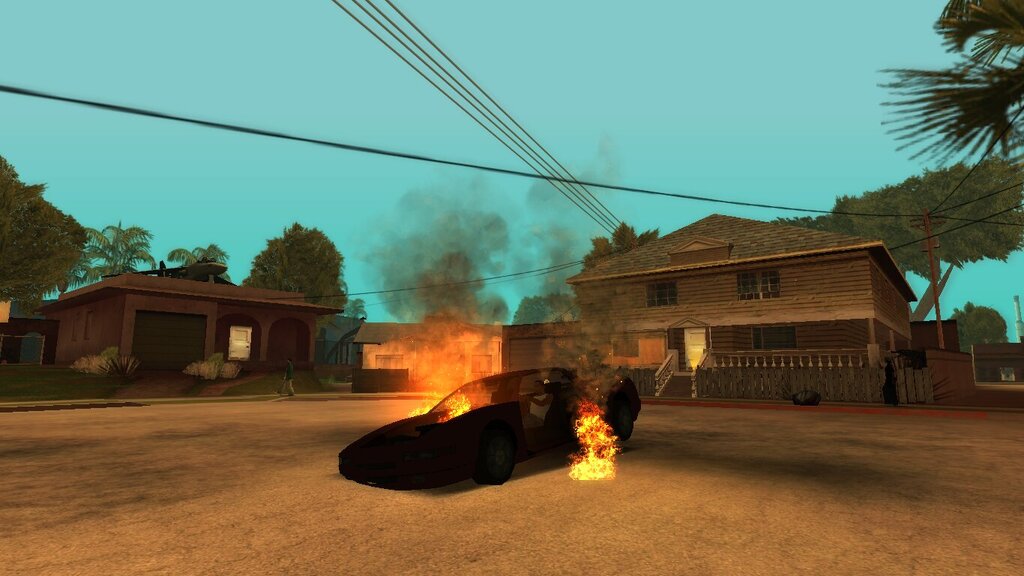
- Ever Sat Inside A Burning Vehicle, Confident That God Mode Would Save You, Only To Get Blown Up Along With The Vehicle?
Yeah, Those Are Exactly The Kinds Of Situations This Script Was Designed To Handle!
"Real God Mode" Patches These Situations, Giving You A More Complete God Mode Experience Without Those Unexpected Deaths. I Looked Everywhere For A Script That Properly Handled These Cases, But Couldn't Find One That Met My Needs. So, I Decided To Build My Own From Scratch & Share It With The Community! ❤️
The Script Is Available For Both GTA San Andreas PC V1.0 & The Mobile Version GTA:SA V2.00, So Mobile Players Can Enjoy It Too!
Whether You Want A Simple Player-Only God Mode OR Full Protection For Both CJ & His Vehicles, "Real God Mode" Gives You The Flexibility To Choose.
The PC Version Comes With A Configurable INI File, While The Mobile Version Offers Both "INI" & "NO INI" Builds To Suit Different Setups.
So Let's Take A Look At What Makes This Script Different!
? FEATURES:
- Real God Mode: Keeps The Player Alive By Preventing Normal Gameplay Damage From Killing Them.
- Parachute Death Protection: Patches The Game's Parachute Landing Death Behavior, Which Can Kill The Player Even When The God Mode Flag Is Enabled.
- Vehicle Explosion Death Protection: Patches The Situation Where The Player Instantly Dies When A Burning Vehicle Explodes While They're Inside It, Even With God Mode Enabled.
- Optional Vehicle God Mode: Automatically Protects Any Vehicle The Player Enters, Preventing It From Taking Damage OR Getting Destroyed While This Feature Is Enabled.
- In-Game Vehicle God Mode Toggle: Enable/Disable Vehicle God Mode On The Fly Without Restarting The Game.
- Fully Configurable INI File: Customize Various Script Features, Activation Controls, Sounds, On-Screen Messages, Protection Options & More.
- Customizable Activation Keys: Assign Your Preferred Keyboard Keys OR Key Combinations Without Having To Look Up Their Key Codes. (PC Version Only!)
- Mobile-Friendly Alternatives: Includes A Mobile "INI" Build & Two "NO INI" Builds With Different Default Vehicle God Mode Settings.
- Safe Configuration Defaults: The Script Uses Default Values When INI Settings Are Missing OR Invalid, Helping It Continue Running Without Unnecessary Crashes Caused By Configuration Problems.
- Clean & Readable Source Code: The Source Code Is Organized & Available For Modders Who Want To Study, Learn From, OR Customize The Script.
- Compatible With Modern CLEO Versions, From CLEO 4.4.4 - CLEO 5.4.0.
- Available For Both PC & Android!
⚙️ CONFIGURATION & INI SETTINGS:
The PC Version & The Mobile INI Version Include A Configuration File Named `Real_God_Mode.ini`, Allowing You To Customize The Script To Your Preferences.
The INI File Already Contains Comments Explaining Each Option & Its Accepted Values. Here's A Quick Overview Of What You Can Configure.
? MAIN INI OPTIONS:
- `ActiveGodMode`: Controls Whether The Script Is Allowed To Operate. The Default Value Is `1` (Enabled). Setting It To `0` Disables The Script's Functionality. (PC Version Only!)
- `ActivationKeys`: Defines The Keyboard Key OR Key Combination Used To Enable/Disable The "Real God Mode". Instead Of Looking Up Numeric Key Codes, You Can Simply Enter Key Names & Combine Them Using The `+` Character. The Default Value Is `ALT + G`. (PC Version Only!)
- `ActivationSound`: Controls Whether The Activation Sound Plays When "Real God Mode" Is Enabled/Disabled. The Default Value Is `1`. Set It To `0` To Disable The Sound.
- `ActivationMessage`: Controls Whether On-Screen Messages Appear When "Real God Mode" Is Enabled/Disabled. The Default Value Is `1`. Set It To `0` To Hide These Messages.
- `ActiveParachuteProtection`: Controls The Parachute Landing Death Protection Patch. The Default Value Is `1`. Set It To `0` To Disable This Specific Patch While Keeping The Main God Mode Functionality.
- `ActiveVehicleExplosionProtection`: Controls The Vehicle Explosion Death Protection Patch. The Default Value Is `1`. Set It To `0` To Disable This Specific Patch While Keeping The Main God Mode Functionality.
- `ActiveVehicleGodMode`: Controls Whether Vehicles Automatically Receive God Mode When The Player Enters Them. The Default Value Is `1`. Set It To `0` To Apply God Mode Only To The Player By Default.
- `ActiveVehicleGodModeStatusMessage`: Controls The On-Screen Vehicle God Mode Status Messages. The Default Value Is `1`. Set It To `0` To Hide The `Vehicle God Mode = ON` & `Vehicle God Mode = OFF` Messages.
- `ActiveVehicleGodModeHelpMessage`: Controls The Help Message Explaining How To Toggle Vehicle God Mode. The Default Value Is `1`. Set It To `0` To Disable This Help Message.
* IMPORTANT: Disabling The Status OR Help Messages Only Hides Their Text. It Does NOT Disable Vehicle God Mode OR Prevent You From Toggling It In-Game!
? VEHICLE GOD MODE: HOW IT WORKS
Vehicle God Mode Is An Optional Feature That Gives Any Vehicle You Enter Protection From Damage & Destruction.
- If `ActiveVehicleGodMode` Is Set To `1`, Vehicles Automatically Receive God Mode When You Enter Them.
- If `ActiveVehicleGodMode` Is Set To `0`, Only The Player Receives God Mode By Default, While Vehicles Remain Vulnerable To Collisions, Damage & Destruction Unless Vehicle God Mode Is Enabled In-Game.
The Best Part? In The PC & Mobile INI Versions, You Can Change This Setting During Gameplay!
✔ PC VERSION:
- Enter Any Vehicle & Press `X` To Toggle Vehicle God Mode.
- If Vehicle God Mode Is ON, Pressing `X` Turns It OFF.
- If Vehicle God Mode Is OFF, Pressing `X` Turns It ON.
- The Script Displays The Updated Status Unless Status Messages Have Been Disabled In The INI File.
✔ MOBILE INI VERSION:
- Enter Any Vehicle & Touch And Hold The Center Of The Screen For 3 Seconds.
- A Countdown Appears Near The Bottom Of The Screen So You Can See How Much Time Remains.
- Once The Countdown Finishes, Vehicle God Mode Changes Its State.
- If Vehicle God Mode Is ON, It Turns OFF.
- If Vehicle God Mode Is OFF, It Turns ON.
- The Script Displays The Updated Status Unless Status Messages Have Been Disabled In The INI File.
* IMPORTANT: This Mobile Control Was Added As An Alternative To A Keyboard Shortcut, Avoiding Conflicts With The Game's Existing Touch Controls.
* IMPORTANT: The Default Vehicle God Mode Toggle Key On PC Is `X` And Can NOT Currently Be Customized Through The INI File. I Plan To Consider Adding A Separate Configuration Option For This In A Future Update, Along With Potential Optimizations & Additional Features! (Maybe!)
? VEHICLE GOD MODE MESSAGES:
The Script Includes Two Separate Options For Controlling Vehicle God Mode-Related Messages.
- `ActiveVehicleGodModeStatusMessage`: Displays The Current Vehicle God Mode State When You Enter A Vehicle & After You Toggle The Feature.
- `ActiveVehicleGodModeHelpMessage`: Displays A Short Instruction Explaining How To Toggle Vehicle God Mode.
On PC, The Help Message Is : `Press 'X' : Toggle Vehicle God Mode`
On Mobile, The Help Message Is: `Hold 'CENTER' 3 Seconds : Toggle Vehicle God Mode`
The Help Message Appears The First Time You Enter A Vehicle After Activating The Script.
It Does NOT Keep Reappearing Every Time You Enter Another Vehicle.
However, If You Disable The Script & Activate It Again, The Help Message Can Appear Again When You Enter Your First Vehicle.
The Vehicle God Mode Status Message Is Separate & Can Appear Whenever You Enter A Vehicle OR Change The Feature's State.
Both Messages Can Be Disabled Independently Through The INI File.
Disabling Them Does NOT Affect The Actual Vehicle God Mode Functionality OR The Ability To Toggle It!
? MOBILE VERSION: INI VS. NO INI
The Mobile Release Includes Two Main Builds: `INI` & `NO INI`.
Both Builds Provide The Core "Real God Mode" Functionality & The Two Additional Death Protection Patches. The Main Difference Is How Their Settings Are Managed.
✔ INI VERSION:
- Includes The `Real_God_Mode.ini` Configuration File.
- Allows You To Customize The Available Settings, Similar To The PC Version.
- Supports In-Game Vehicle God Mode Toggling By Holding The Center Of The Screen For 3 Seconds While Inside A Vehicle.
- Requires The `IniFiles.so` Plugin For The INI Configuration To Be Read Correctly.
* IMPORTANT: If The Required `IniFiles.so` Plugin Is Missing OR Not Working, The INI File Will NOT Be Read. The Script Can Still Run Using Its Built-In Default Values, But Your Custom Settings Will NOT Take Effect.
✔ NO INI VERSION:
- Does NOT Require The `IniFiles.so` Plugin.
- Uses Built-In Default Values Instead Of Reading An INI File.
- Does NOT Allow You To Customize The Other INI Settings.
- Does NOT Include The In-Game Vehicle God Mode Toggle Available In The INI Build.
- Offers Two Separate Builds So You Can Choose Whether Vehicle God Mode Is Enabled OR Disabled By Default.
The NO INI Build Is Ideal For Players Who Can NOT OR Do NOT Want To Install The Required INI Plugin.
Both Builds Have The Same Core Player God Mode & Additional Death Protection Features. So Choose The Version That Best Suits Your Setup!
? MOBILE NO INI: CHOOSE YOUR VEHICLE MODE
Inside The `NO INI` Folder, You'll Find Two Builds:
✔ `Vehicle God Mod = ON`
- Vehicle God Mode Is Enabled By Default.
- Whenever You Enter A Vehicle, It Automatically Receives God Mode.
- Both Player God Mode & The Additional Death Protection Patches Remain Available.
✔ `Vehicle God Mod = OFF`
- Vehicle God Mode Is Disabled By Default.
- God Mode Applies To The Player Only.
- Vehicles Can Still Take Damage, Get Damaged In Collisions & Be Destroyed.
- Both Additional Death Protection Patches Remain Available.
- The In-Game Vehicle God Mode Toggle Is NOT Available In The NO INI Builds.
Choose The Folder That Matches Your Preferred Gameplay Style Before Installing The Script.
* IMPORTANT: The Two NO INI Builds Differ Only In Their Default Vehicle God Mode Behavior. Other Configurable INI Features Use Their Built-In Default Values.
? PC INSTALLATION:
✔ METHOD 1: Using ModLoader (RECOMMENDED)
- Extract The Downloaded `Real God Mode` Archive.
- Open The `PC Version` Folder.
- Copy The `Real God Mode` Folder.
- Paste It Into Your GTA San Andreas `ModLoader` Directory.
- (Optional) Open `Real God Mode\Real_God_Mode.ini` With Any Text Editor & Customize The Settings To Your Preferences.
- Done!
✔ METHOD 2: Manual Installation (Without ModLoader)
- Extract The Downloaded `Real God Mode` Archive.
- Open The `PC Version` Folder.
- Navigate To `Real God Mode\CLEO\`.
- Copy Both `Real_God_Mode.cs` & `Real_God_Mode.ini`.
- Navigate To Your GTA San Andreas Installation Directory & Open The `CLEO` Folder.
- Paste Both Files Into The `CLEO` Folder.
- (Optional) Open `Real_God_Mode.ini` With Any Text Editor & Customize The Settings.
- Done!
? MOBILE INSTALLATION:
Before Installing, Open The `Mobile Version` Folder.
As I Said Before, You'll Find Two Main Folders:
- `INI`: The Configurable Build, Which Requires The `IniFiles.so` Plugin To Read Its INI File.
- `NO INI`: The Build With Built-In Default Settings, Available With Vehicle God Mode ON OR OFF.
* IMPORTANT: I Recommend The INI Build If You Want More Control Over The Script's Settings. However, If You Prefer A Simpler Installation OR Can NOT Use The INI Plugin, Choose The NO INI Build.
✔ METHOD 1: Installing The Mobile `INI` Version
- Open The `Mobile Version\INI` Folder.
- Inside, You'll Find Two Folders: `Android` & `Android_Unprotected`.
- Determine Which Game Build You're Using:
- Standard / Protected Build: Uses The `Android` Data Directory.
- Unprotected Build: Uses The `Android_Unprotected` Data Directory. - Open Your Device's File Manager & Navigate To Your Internal Storage Root Directory.
- Copy The Matching Folder From Your Selected Mod Directory.
- Paste The Selected Folder Into Your Internal Storage Root Directory.
- Wait For The Files To Finish Copying.
- Done!
✔ METHOD 2: Installing The Mobile `NO INI` Version
- Open The `Mobile Version\NO INI` Folder.
- Inside, You'll Find Two Folders: `Vehicle God Mod = ON` & `Vehicle God Mod = OFF`.
- Choose Your Preferred Default Vehicle God Mode State:
- `Vehicle God Mod = ON` : Automatically Enables Vehicle God Mode When You Enter A Vehicle.
- `Vehicle God Mod = OFF`: Applies God Mode To The Player Only By Default. - Open Your Selected Folder.
- Inside, You'll Find Two More Folders: `Android` & `Android_Unprotected`.
- Determine Which Game Build You're Using:
- Standard / Protected Build: Uses The `Android` Data Directory.
- Unprotected Build: Uses The `Android_Unprotected` Data Directory. - Copy The Matching Folder From Your Selected Mod Directory.
- Open Your Device's File Manager & Navigate To Your Internal Storage Root Directory.
- Paste The Selected Folder Into Your Internal Storage Root Directory.
- Wait For The Files To Finish Copying.
- Done!
? CREDITS & ACKNOWLEDGMENTS:
First Of All, Huge Thanks To `KVVKRISHNA`, `Lapo Sapo`, `Kaizo M` & `LGKiller93` For Their Ideas & Inspiration Through Their Work.
Their Work Inspired Me To Explore The Idea Further & Create My Own More Feature-Rich God Mode Script.
However, "Real God Mode" Is A Separate Script That I Wrote Myself, Line By Line, With Its Own Features, Configuration Options, Mobile Support & Additional Protection Patches.
The Complete Source Code Is Included & Organized For Anyone Interested In Learning How The Script Works. You Can Decompile & Study It Using SannyBuilder, Explore Its Logic, OR Use It As A Learning Resource For Your Own CLEO Projects.
I Respect The Work Of Other Modders & Believe That Everyone Deserves Credit For Their Contributions. If You Share This Script Elsewhere, Please Give Proper Credit To The Original Author & Do NOT Claim The Work As Your Own.
- AUTHOR: ArAsH
- EMAIL : [email protected]
- TOOLS : SannyBuilder 4.2.0, CLEO 4,5
评论
目前已发表了 1 条评论。